


Key Takeaways
Document search returns files and passages for a user to read, while retrieval-augmented generation (RAG) gives retrieved details to a large language model (LLM) that writes an answer. That is why RAG can turn unconfirmed evidence into a convincing answer.
Use document search to find a file and RAG to get a specific answer. Choose document search to locate a specific file or examine original sources yourself, and RAG for an explanation, comparison, or synthesis from a defined set of sources.
A RAG answer is only as trustworthy as the evidence it’s based upon. Faithful answers depend on extraction that preserves document structure, chunks that keep their context, a well-defined corpus, and enforced permissions.
Permissions must be enforced before answer generation. Restricted documents must stay out of the resource pool a model uses to write an answer, because hiding the citation afterward does not hide what the answer reveals. The test is whether two users with different access rights each get answers based only on what they may see.
In enterprise file environments, CTERA Search finds files while honoring existing access control lists, and CTERA Experts runs RAG on live file data in the CTERA Global File System.
Search helps us find what to read. Retrieval-augmented generation (RAG) helps us make sense of it. The challenge is preserving what the evidence actually says as we move from documents to answers.
What changes when a system answers a question about your documents instead of showing you where to look for them?
With document search, you enter a query, inspect the results, and open the files that seem useful. RAG takes that process further: it retrieves relevant material and gives it to a language model to compose an answer. Both approaches help people use information buried in documents, but they differ in how much of the work they do for you.
Finding a Document vs. Answering a Question
Consider the difference between “Find our travel policy” and “Can I expense a hotel the night before an early flight?” The first request calls for a document. The second calls for an interpretation of its rules written in one or multiple documents. That might include an exception in one section or an update published elsewhere, even in a second document. Finding a passage about hotels is a useful start. Answering correctly requires knowing which policy applies and what its conditions mean.
That’s why the choice between document search and RAG involves more than a preference for a results page or a chat window. Document search gives the reader material to evaluate. RAG performs some of that evaluation on the reader’s behalf. It can save time, but it can also turn incomplete or misunderstood evidence into a convincing answer.
Understanding when to use each approach starts with what they share: retrieval. How does the system find relevant material? How does it preserve context and respect permissions? And what additional care is needed before that material can support an answer?
What Is RAG (Retrieval-Augmented Generation)?
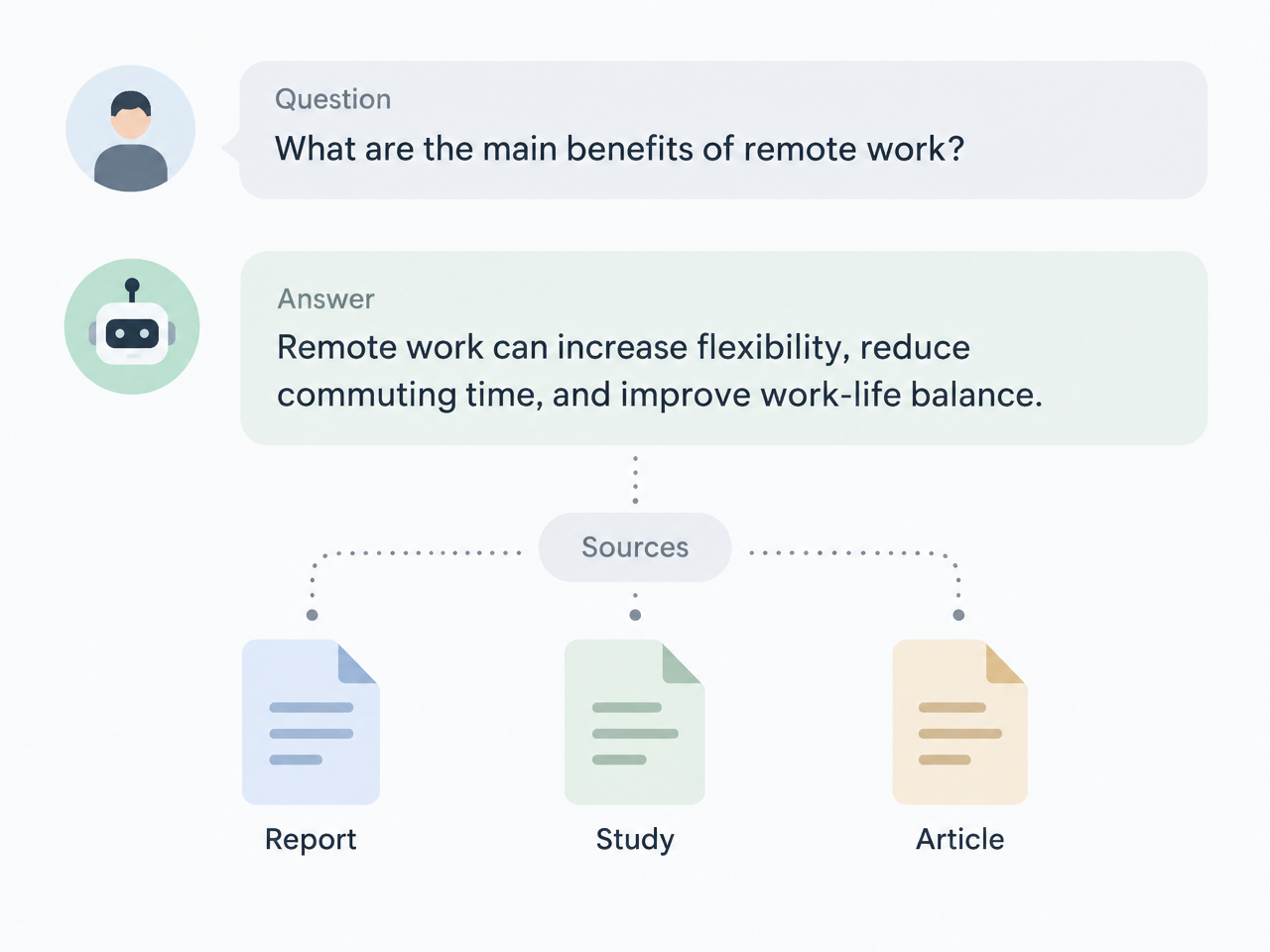
RAG is an approach that combines information retrieval with language-model generation. A RAG system retrieves material relevant to a question and supplies it to a language model, which uses that material to compose a response. The result might be a summary, a comparison, an explanation, or a direct answer with references to its sources.
The term RAG comes from a 2020 paper by Patrick Lewis and colleagues, accepted at NeurIPS 2020: Retrieval-Augmented Generation for Knowledge-Intensive NLP Tasks.
The retrieved material gives the model information to work with beyond what it learned during training. That material can include an organization’s internal documents or information that changes over time. But retrieving that information doesn’t guarantee that the model will interpret it correctly.
What Is Document Search?
Document search locates files and passages relevant to a query. It usually presents ranked results with snippets or previews. It can use keyword matching, semantic similarity, metadata filters, or a combination of methods.
The reader does the final work of interpretation: opening the documents, checking the surrounding text, considering the sources, and deciding what they mean.

How Does RAG Differ from Document Search?
Document search returns material for a person to examine. RAG uses retrieved material to generate an answer. Both depend on retrieval, but RAG adds a synthesis step that takes on some of the reader’s interpretive work.
Think of document search as a librarian bringing you the right books. RAG adds a research assistant who reads selected passages and drafts a response. That assistant can save you considerable time. But the quality of the response depends on which passages are selected and how carefully they’re interpreted.
| Comparison | Document search | RAG |
|---|---|---|
| Typical output | Files and passages to inspect | An answer based on retrieved material |
| Main benefit | Helps the user locate useful sources | Helps the user synthesize information from those sources |
| Interpretive responsibility | Primarily with the reader | Partly delegated to the system |
| Key question | “Did it find the right material?” | “Does the material support what the answer says?” |
These are complementary capabilities. A user may begin with a broad search to understand what’s available, then ask questions about a selected set of documents. A generated answer may, in turn, prompt the user to open a source and investigate further.
The important distinction is the work being delegated. When search returns a document, it’s saying, in effect, “This may be useful.” When RAG writes an answer, it’s making a stronger claim: “This is what the evidence supports.”
How Are Documents Prepared for Retrieval?
Before either workflow can be useful, the system needs a readable representation of the source material.
For a plain text file, that can be straightforward. For a scanned contract, it may require optical character recognition. A recording needs transcription. A complex PDF may require careful reconstruction of columns, tables, headings, and footnotes.
This preparation is easy to underestimate because, when it works, it is invisible.
Consider a table that lists service commitments. One column contains a standard response time; another contains exceptions. If extraction separates the values from their headings, the system might retain every word and number but lose the relationship between them. A model could then confidently present an exception as the general rule.
Or consider a deposition transcript. If extraction loses the labels identifying the questioner and witness, a lawyer’s question may be mistaken for the witness’s statement.
The goal, then, is to preserve more than text. The system also needs the structure that makes the text intelligible: who’s speaking, which heading applies, what a footnote qualifies, and where a passage belongs in the document.
Document identity matters, too. A useful retrieved passage should stay connected to its source, location, version, and access permissions. Otherwise, the system may find the right words but be unable to tell whose words they are. It also may not know whether the words are current or whether the user is allowed to see them.
Keyword Search vs. Semantic Search in RAG
There are several ways to find relevant material. Two common approaches are keyword search and semantic search:
Keyword search works with the words and terms in an index. It’s especially useful when the wording itself matters: a contract number, a product code, a person’s name, or a distinctive phrase. If you need the document mentioning “ZX-417,” an exact match is a strong clue.
Semantic search helps when the question and the source express related ideas in different wording. Someone might ask, “Can we end the agreement early?” while the relevant clause discusses “termination before the end of the initial term.”
What Is an Embedding Model?
A common way to support semantic search is through embeddings. An embedding model converts text into a numerical representation called a vector. The query is represented in the same way. The system searches for vectors that are close according to a similarity measure. This approach is often called a vector search.
A rough analogy is a map, though an embedding is not literally a two-dimensional map. It’s a vector with many dimensions, where each dimension contributes to a learned representation of meaning. In a simplified visualization, passages about related subjects might appear in nearby neighborhoods. A question about ending an agreement may be close to clauses about cancellation and termination, even if they don’t share its wording.
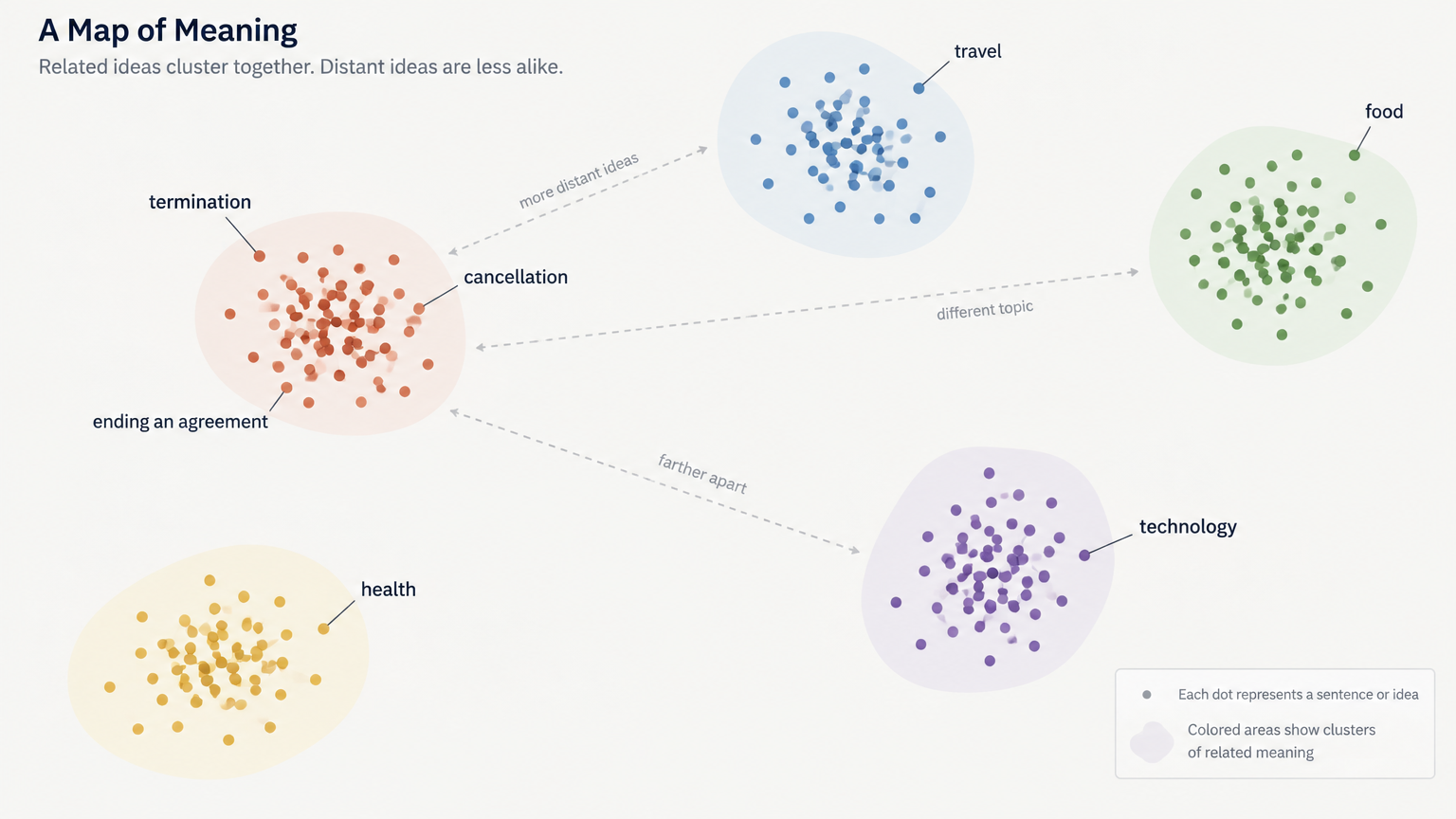
But this is a map of learned relationships, not a map of truth. Two passages can be close because they discuss the same subject, even if they reach opposite conclusions. Similarity helps identify candidates; it doesn’t establish which one answers the question correctly.
What Is Hybrid Search in RAG?
Many systems combine keyword and semantic retrieval. This hybrid approach can use exact terms to find a specific agreement. It can then use semantic similarity to locate the relevant clause within it. An additional ranking step can compare candidate passages more closely against the question.
Microsoft’s Azure AI Search documentation describes hybrid search as a single request that runs full-text and vector queries together, with optional semantic ranking to improve the quality of the initial results.
Does RAG Require a Vector Database?
No. RAG can use any of these retrieval methods. It doesn’t require embeddings or a vector database. Its defining feature is that retrieved material is supplied to a language model to help generate a response.
How Does Chunking Affect Context in RAG?
Chunking determines how much surrounding context a retrieved passage carries into a recommended answer. Long documents are often divided into smaller pieces, or chunks, for indexing and retrieval. These might be paragraphs, sections, or groups of sentences.
Chunking has a practical advantage: the system can retrieve a passage about a phone call without passing hundreds of pages to the model. The difficulty is deciding how much surrounding material the passage needs.
For example, a chunk might contain the sentence “The call took place on Tuesday.” That chunk could be retrieved without the surrounding testimony, which shows the witness was only speculating or repeating someone else’s account. Read alone, the sentence might be mistaken for a confirmed fact rather than a limited or secondhand statement.
This is why a chunk that scores as highly relevant based on semantic distance is not automatically good evidence.
The same issue appears outside legal work. A proposal is not an approved plan. A draft policy is not the policy in force. A forecast is not a recorded result.
Good retrieval design gives the model a fair chance to recognize these differences. It can carry headings and source metadata with each chunk, retrieve neighboring passages, or fetch a larger section when a short excerpt is ambiguous. The right amount of context depends on the document and the question. More text helps only if it supplies the context that matters.
How Do You Choose the Right Data Sources for RAG?
A broad index is valuable for discovery. It lets users search across departments, projects, or years of accumulated files. But a broad collection also creates more opportunities to retrieve something that looks relevant but belongs elsewhere.
Suppose a company has dozens of customer agreements with similar language. A question about one customer’s termination rights should be answered from that customer’s applicable agreement and its amendments. A nearly identical clause from another contract may be an excellent semantic match and entirely wrong for the task.
The collection of material available for a particular task is often called its corpus. Defining that corpus is an important part of defining the question.
In practice, the scope might include a case identifier, a customer, a jurisdiction, a product version, or an effective date. Some boundaries can be established when the data is prepared. Others need to be applied when the user asks a question. Metadata filters can help enforce them during retrieval.
A simple instruction such as “use the current contract” is only useful if the system can identify which contract is current and retrieve within that boundary. The application needs to turn the instruction into a concrete selection of sources.
There is a balance here. An overly broad scope admits unrelated material. An overly narrow one may exclude a decisive amendment or a contradictory document. The aim is to include the evidence needed to answer the question, with enough context to understand it.
When that scope is unclear, asking “Which customer agreement do you mean?” can be the most useful next step.
Should RAG and Document Search Enforce Access Permissions?
Yes. Both document search and RAG must adhere to access controls and permission policies, because relevance and authorization answer different questions.
A document may be exactly what the system needs to answer a query and still be off-limits to the person asking.
Both document search and RAG must respect that boundary. Document search should protect file names, snippets, and previews as well as document contents. RAG must keep unauthorized material out of the context used to generate the user’s answer.
Hiding a citation after generation doesn’t solve the problem. If the model has already used a confidential document, its answer may reveal the substance without naming the source.
Imagine an assistant who reads a restricted acquisition memo, then tells an unauthorized user, “You should expect a major organizational change next month.” Leaving out the memo’s name hasn’t preserved confidentiality.
Permission checks therefore belong in the retrieval and context-building process, before restricted information can influence the response. They also need to cover follow-up source fetches and connected tools. Stored passages, cached answers, and previously indexed permissions deserve particular attention when access changes.
The practical test is whether two people with different access rights each receive answers based only on the material they’re currently authorized to use.
What Is Agentic RAG?
Permission checks assume a fairly linear path: retrieve, filter, generate. Some systems go further. They use an AI agent to decide which retrieval tools to use and what to do next. This is called agentic RAG.
Agentic RAG is a model in which an AI agent decides which retrieval tools to use and what to do next, rather than following a linear path of retrieve, filter, and generate.
For example, an assistant handling a contract question might identify the customer, locate the applicable agreement, and retrieve its termination clause. It might then check for amendments before drafting an answer.
That flexibility is useful when one retrieval call isn’t enough. It also makes source selection a decision that needs to be tested. If the assistant chooses the wrong customer or overlooks an amendment, its later reasoning may be careful but still lead to the wrong conclusion.
A dependable workflow makes those choices observable: which collection was searched, which filters were applied, which documents were opened, and what supported the final answer. When a key choice is ambiguous, the workflow should allow for clarification before proceeding.
How Does This Apply to Enterprise File Data?
The same distinction shows up in enterprise file environments. CTERA Search indexes the full content of files, including scanned documents through OCR, and inherits existing access control lists, so users find and see results only from files they already have permission to access. CTERA Experts, a core component of the CTERA Intelligent Data Platform, takes the next step: it runs retrieval-augmented generation on live data in the CTERA Global File System and supplies the retrieved context to a large language model, with the data staying inside the organization’s security perimeter. Search helps people find what to read. Experts helps them ask questions of a curated set of files.
When Should You Use RAG vs. Document Search?
Use document search when you need to locate a specific file or examine original sources yourself.
Use RAG when you need a focused explanation, comparison, or synthesis from a defined set of sources.
Many workflows benefit from both: search to establish an initial corpus of documents, then RAG to help interpret them.
RAG can save substantial human effort, but it’s difficult to do well. The central challenge is keeping a faithful connection between the question, the selected evidence, and the answer. That depends on careful extraction, appropriate retrieval, a well-defined scope, and enforced permissions. It also depends on enough context to carry meaning from the source document through to the conclusion.
Circling back to the question about expensing a hotel. Finding the travel policy gets the reader to the right place. Answering the question requires checking the applicable rule, its exceptions, and whether the policy is current. The value of RAG lies in doing that extra work well, and in recognizing when the available documents leave the question unresolved.
The goal is an answer that still holds up when the reader opens the source.
Frequently Asked Questions
- What is the difference between RAG and document search?
Document search returns ranked files and passages for a user to read and interpret. RAG retrieves relevant information and gives them to a large language model, which writes an answer. Both depend on retrieval, and the difference is who does the interpreting.
- Does RAG require a vector database?
No. RAG can use keyword, semantic, or hybrid retrieval to generate answers. Its defining feature is that retrieved material is supplied to a language model to help generate a response.
- Should RAG enforce access permissions?
Yes. Unauthorized information access must be kept out of the context used to generate an answer, because hiding a citation after generation does not hide the substance.
- When should I use document search instead of RAG?
Use document search when you need to find a specific file or examine original sources yourself. Use RAG when a focused explanation is needed, or when generating a comparison, or synthesis from a defined set of sources. Many workflows use both.
-
 CTO
Aron Brand, CTO of CTERA Networks, has more than 22 years of experience in designing and implementing distributed software systems. Prior to joining the founding team of CTERA, Aron acted as Chief Architect of SofaWare Technologies, a Check Point company, where he led the design of security software and appliances for the service provider and enterprise markets. Previously, Aron developed software at IDF’s Elite Technology Unit 8200. He holds a BSc degree in computer science and business administration from Tel-Aviv University.


