Why Your Cloud Storage Feels Slow, and the Hidden Metadata Problem Behind It
Imagine walking into a massive library, the size of a city block, filled with every book you could ever need. The catch? The card catalog is in another state.
Every time you want to find a book, or even just browse a section, you must make a long-distance call and wait for the librarian to read the details back to you. One by one.
Sounds maddening, doesn’t it? This is what happens when your office uses a cloud-caching edge filer without local metadata.
You might efficiently store your files, which contain the actual data, in the cloud.
However, the map to those files, the metadata (e.g., file names, sizes, modification dates, permissions), lives far away. Therefore, every click, folder browse, and search feels like a long-distance call.
The result is a frustrating lag that slows down your cloud storage. It feels slower than the old server in the closet.
This is the performance bottleneck that nobody discusses, but everyone feels.
And CTERA Edge Filers have a simple solution: Metadata Pinning.
Metadata Pinning: Bringing the Card Catalog Back to the Library
Metadata Pinning is exactly what it sounds like: It “pins” a copy of the file system’s card catalog, i.e., the entire directory structure, directly onto your local CTERA Edge Filer. Instead of making that long-distance call to the cloud just to see what’s in a folder, your filer already knows.
CTERA’s Metadata Pinning Eliminates Cloud Storage Lag
The difference is (and benefits are) night and day. Here’s how this simple shift transforms your daily workflow:
- Instantaneous Browsing: With the entire namespace stored locally, browsing folders and navigating through complex project directories becomes instantaneous. Having the global namespace downloaded locally gives the organization greater control and speed. Clicking through your file shares feels just like using local storage devices- because the directory acts as if it is local.
- Lightning-Fast Search: Remember waiting for search results to crawl back from the cloud? With pinned metadata, you can use built-in searches, like macOS Spotlight, to quickly find what you need in millions of files.
This is a game-changer for creative professionals and data-heavy workflows mentioned in the analyst report. No more workarounds or waiting; you just search and find. - Accelerated Application Performance: Many applications need to scan a directory before opening a file. Think of design software, video editing suites, or engineering applications. When metadata is remote, these apps can slow to a crawl. By storing the metadata locally, applications get the information they need right away. This cuts loading times and helps your team get back to work.
It’s Not Just Speed, It’s Control; Transform Your Hybrid Cloud with Localized Metadata Control
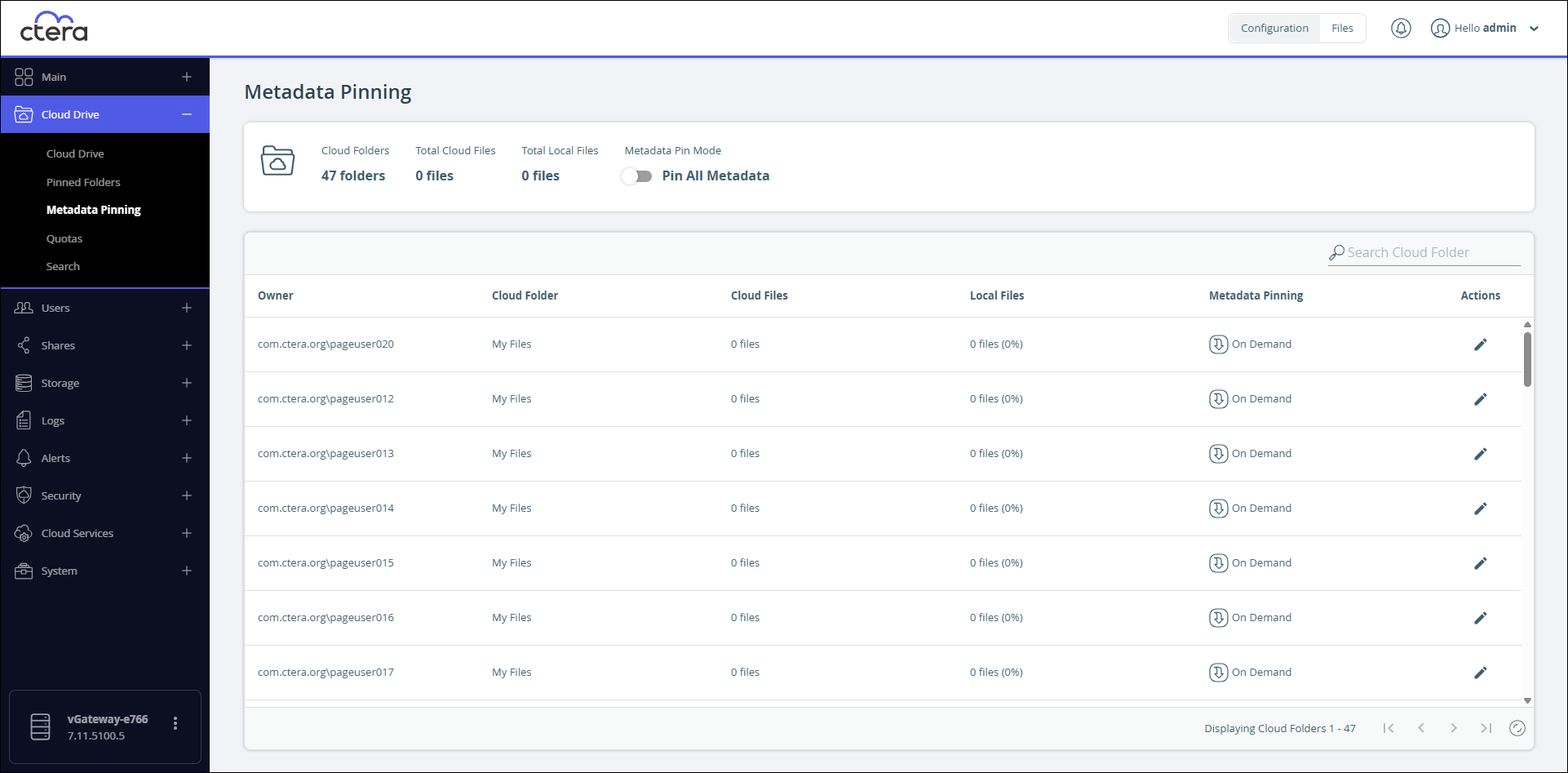
Beyond the raw performance, Metadata Pinning gives you a clear view of your world. The CTERA interface shows the progress of the metadata download. This way, you always know the sync status of your file system.
You can choose to pin everything or just the specific, high-priority project folders that your teams use daily.
By cutting out the constant talk between the edge and the cloud for basic directory info, you make things faster.
You’re creating a more resilient, responsive, and intuitive file infrastructure. You’re turning your hybrid cloud solution from a compromise into a competitive advantage.
Stop waiting for the spinning wheel. Bring your card catalog back where it belongs and let your team work at the speed of thought.