Viewing Reports
The CTERA Portal provides the following global administration reports:
• Storage
• Portals
• Devices
• Plans by Portal
• Global Plans
• Add-ons by Portal
• Global Add-ons
In this section
Viewing the Storage Report
Global administrators can view information about the CTERA Portal storage nodes.
To view the Storage Report:
1 In the navigation pane, click Main > Reports.
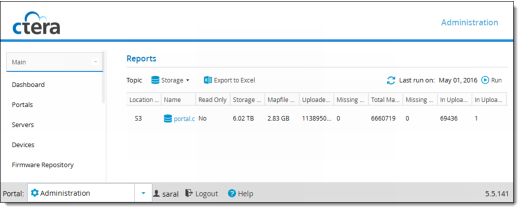
The Main > Reports page opens, displaying the Storage Report.
If a CTERA Portal administrator already ran the Storage Report, the report is displayed, and the report date is displayed in the Last run on field. For information on the fields displayed, see the following table.
2 If the Last run on field displays "Never", or if you would like to update the displayed report, click Run.
A new report is generated. For information on the fields displayed, see the following table.
This field... | Displays... |
Location Type | The storage node's type. |
Name | The name of the storage node. |
Read Only | Indicates whether the storage node is read only. |
Storage Space | The amount of storage space available on this storage node. |
Mapfile Overhead | The amount of space consumed by the mapfiles for this server. |
Uploaded Blocks | The number of uploaded blocks in this storage node. |
Missing Blocks | The number of missing blocks in this storage node. |
Total Mapfiles | The total number of mapfiles in this storage node. |
Missing Mapfiles | The number of missing mapfiles in this storage node. |
In Upload Blocks | The number of blocks currently being uploaded to the storage node. |
In Upload Mapfiles | The number of mapfiles currently being uploaded to this storage node. |